
Category: Professional practice
Category: Professional practice |
| Teaching and Learning Forum 2013 [ Refereed papers ] |
Daniel Oswald and Steven Hinckley
Edith Cowan University
Graham Wild
RMIT University
Email: s.hinckley@ecu.edu.au, Graham.Wild@rmit.edu.au
In this paper, we report the development and application of a multimedia resource designed to complement learning activities in undergraduate engineering and physics laboratories on the setup and operation of a digital storage oscilloscope. The development and design of this resource was kept as simple as possible. Cognitive load theory, in which the learning tool was designed to minimise extraneous cognitive load in students, was used as the guiding design framework. This resource has demonstrated a significant improvement in students' understanding and confidence in the use of the digital storage oscilloscope and associated test equipment. Student feedback has indicated areas of improvement required, such as in text-to-speech quality.
Mayer (1997, 2003a) suggested that a single medium explanation (i.e. verbal or written) does not ensure that students understand what has been explained. A search of the literature indicated a lack of multimedia instructional material on the operation of a DSO at a level appropriate for undergraduate students being exposed to this instrument for the first time. Hence, in this study, we developed an audiovisual multimedia resource ("Multimedia Tutorial") on the setup and operation of a DSO and function generator for basic measurements of waveform properties, with specific application to DSO models used in the School of Engineering at ECU. This resource is used to implement a method of instruction that incorporates a multimedia presentation which complements written instructions and supervision of students in the laboratory. The audiovisual demonstration focuses primarily on the setup of a DSO and a function generator, as setting up is normally the hardest part of the laboratory exercise for an inexperienced student. This Multimedia Tutorial is aimed at undergraduate first year students, though it also has use for retraining students in the operation of a DSO in later years. The main purpose of the study is to reduce the complexities of laboratory experiments and increase the retention of knowledge for students who study physics and engineering at ECU. The Multimedia Tutorial can be viewed by students at any time, so that learning activities are not restricted to the laboratory setting.
|
• People are mentally active in their attempts to understand how the world works. • Learning and development depend on the learners experiences. • Learners construct - they do not record - knowledge in an attempt to make sense of these experiences. • Knowledge that is constructed depends on knowledge that learners already possess. • Learning is enhanced in a social environment. • Learning requires practice and feedback. |
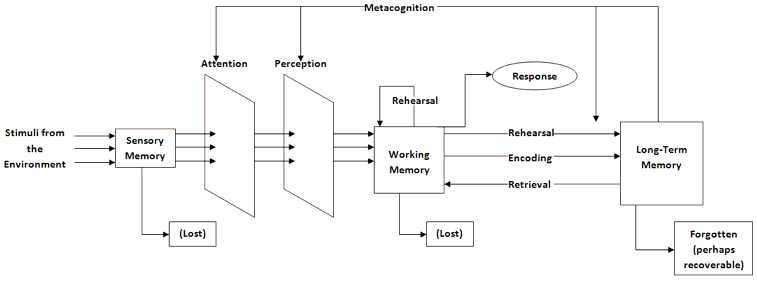
Figure 1: The information processing model
(adapted from Eggen & Kauchak, 2007)
Sensory memory
This area of the memory deals with the stimuli that are processed through our senses (Errey, Ginns, & Pitts, 2006). These particular memories are not held for very long in this area, on average the memory lasts for about half a second for visual information, and three seconds for audio information. This memory area has a virtually unlimited capacity, with the information content constantly being overwritten because of the vast quantity of data that enters this system (Eggen & Kauchak, 2007). If the information is not processed immediately then the information has no meaning and won't be integrated. This last point has repercussions with multimedia learning, because if the image is not held on the screen for an extended period of time, then the learner will not be able to extract any information for processing in the next area. This memory area holds onto information until the learner has attached meaning. Meaning is created when the input information arrives at the working memory for interpretation.
Working memory
This is the system that actively holds multiple pieces of information such as audio and pictures, and makes them available for further information processing (Eggen & Kauchak, 2007). This particular area can only hold about five to nine objects at any given time. It stores and holds the information until it can be processed. It is an integral part of the cognitive processing system, and is the area where deliberate thinking happens. The results of this thinking process can either be placed into long-term memory or goes back into sensory memory (Errey, Ginns, & Pitts, 2006). Information that is stored in the working memory has the potential to be combined with previous information that is stored in long-term memory; this new type of information can be manipulated, interpreted, or recombined with newer knowledge to continue the process again.

Figure 2: Total cognitive equation
(adapted from Amarasing, 2009)
The most striking feature of this area is its limitations. These limitations are considered quite important by some researchers, because this is the area where the learner makes conscious decisions on how to link new knowledge with prior knowledge. This limitation is commonly referred to as cognitive load, which is defined as the total amount of mental activity that is placed on the working memory at any one time (Amarasing, 2009). There are separate loadings that combine together to make up the total cognitive load; intrinsic, germane, and extraneous. Figure 2 (above) and Table 2 (below) provide details of each of the three cognitive loads.
| Cognitive load type | Explanation |
| Intrinsic | This depends on the complexity or the difficulty level of the information. It is the memory required for the thinking task at any given instance. It measures the amount of working memory is used to complete the amount of information that needs to be process. This type of load cannot be modified by instructional design. |
| Germane | Is the load that is a part of building newer and more complex schema. By doing this a novice learner is able to transition to an expert learner. |
| Extraneous | Is a resultant of the techniques in which information to be learned is presented in. This type of load does not contribute to the learning process. This type of load can be modified by instructional design methods. |
The implications of this include: that when the intrinsic load is low, there may be sufficient mental resources that are remaining to enable the learner to learn information for instructional material even with high extraneous load. The opposite is if the learner has high intrinsic load, and therefore will have high extraneous load, the resultant is learning may fail to occur. Modifying the instructional material may lower the extraneous load, leading to learning (Amarasing, 2009). Figure 3 demonstrates the different scenarios.
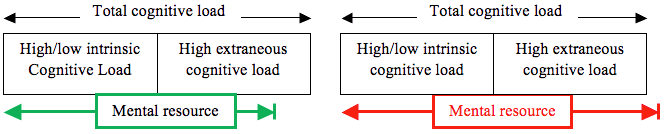
Figure 3: Situations where (a) learning can occur, and (b) learning cannot occur
(adapted from Amarasing, 2009)
Reducing cognitive load in multimedia presentations
The issue for instructional designers is to reduce the extraneous cognitive load that is placed on the learner. In this section, we will analyse design principles that have been developed to reduce the cognitive load on students. Table 3 presents a number of different design principles that have been develop by Mayer (2003b) and tested amongst learners. These principles present different methods to reduce the cognitive load that is placed on the learner. Table 4 illustrates different cognitive overload scenarios, and methods to reduce the loading pressures which are placed on the individual (Mayer & Moreno, 2003).
| Principle | Summary of the principle |
| Modality | Present the words in narration spoken form. |
| Contiguity | Synchronise audio and the animation at the same time. |
| Multimedia | Design a presentation with both words and pictures. |
| Personalisation | Narration of words should be design presented in conservation style not in a formal style. |
| Coherence | Avoid using extra and irrelevant information. |
| Redundancy | When using animation and narration in a multimedia explanation avoid using redundant online text. |
| Pre-training | When designing multimedia explanation, begin with explanation of the components used in the explanation. |
| Signalling | Designing multimedia use signalling cues for the learner. |
| Pacing | Allow the learner to have control over the pace of the presentation. |
| Type of overload scenario | Load reducing method | Description of research effect |
| Type 1: Essential processing in visual channel > cognitive capacity of visual channel | ||
| Visual channel is overloaded by essential processing demands. | Off-loading: Move some essential processing from visual channel to auditory channel. | Modality effect: Better transfer when words are presented as narration rather than as on-screen text. |
| Type 2: Essential processing (in both channels) > cognitive capacity | ||
| Both channels are overloaded by essential processing demands. | Segmenting: Allow time between successive bite-size segments. Pre-training: Provide pre-training names and characteristics of components. | Segmentation effect: Better transfer when lesson is presented in learner-controlled segments rather than as continuous unit. Pre-training effect: Better transfer when students know names and behaviours of system components. |
| Type 3: Essential processing + incidental processing (caused by extraneous material) > cognitive capacity | ||
| One or both channels overloaded by essential and incidental processing (attributable to extraneous material). | Weeding: Eliminate interesting but extraneous material to reduce processing of extraneous material. Signalling: Provide cues for how to process the material to reduce processing of extraneous material. | Coherence effect: Better transfer when extraneous material is excluded. Signalling effect: Better transfer when signals are included. |
| Type 4: Essential processing + incidental processing (caused by confusing presentation) > cognitive capacity | ||
| One or both channels overloaded by essential and incidental processing (attributable to confusing presentation of essential material). | Aligning: Place printed words near corresponding parts of graphics to reduce need for visual scanning. Eliminating redundancy: Avoid presenting identical streams of printed and spoken words. | Spatial contiguity effect: Better transfer when printed words are placed near corresponding parts of graphics. Redundancy effect: Better transfer when words are presented as narration rather than narration and on-screen text. |
| Type 5: Essential processing + representational holding > cognitive capacity | ||
| One or both channels overloaded by essential processing and representational holding. | Synchronising: Present narration and corresponding animation simultaneously to minimise need to hold representations in memory. Individualising: Make sure learners possess skill at holding mental representations. | Temporal contiguity effect: Better transfer when corresponding animation and narration are presented simultaneously rather than successively. Spatial ability effect: High spatial learners benefit more from well-designed instruction than do low spatial learners. |
The simplified method we have used to develop the instructional Multimedia Tutorial has additional advantages, particularly in terms of the resources required to modify the current tutorial, so that updated and further instructional multimedia presentations can be developed. The process developed is time efficient and the particular problem of synchronising the audio narration with the visual slides is solved.

Figure 4: Design overview for the presentation
The Multimedia Tutorial is an explanation of the basic functionality of the DSO and the function generator. The presentation is broken into different sections focusing on the different aspects of the laboratory worksheet that all students traditionally use. Figure 5 shows a typical slide from the presentation explaining to students how to display a sine wave on the oscilloscope using the function generator.
The first section is an introduction explaining to the students; the outline, goals, and the equipment to be used in the current laboratory session. The next section is an animation on how to connect the function generator to the DSO. The second half of this section explains the function generator and how to utilise it to display a sinusoidal waveform on the DSO screen. We then move onto explaining how to use the oscilloscope, with the key focus of avoiding using the Auto-Scale button, as this can set the DSO to incorrect default setting, and ingrain poor habits in students. The third section involves how to measure different features of the waveform on the oscilloscope. The final section is a summary of the Multimedia Tutorial. The Multimedia Presentation operates for a total of 6 minutes and 30 seconds. For someone to create a similar multimedia presentation, only requires some knowledge of how to use Microsoft PowerPoint in the ability to draw, animate, and synchronise animations with audio files. While this first presentation requires a longer design timeframe (up to 10 hours for stages 1 to 3), further presentations may only take 2-3 hours to complete the first three stages of Figure 4.
| Stage | Mayer's principle | Benefits | Cost |
| 1 | • Pre-training | • Easy to update • Acts as a storyboard for how the presentation proceeds in a logical manner | • No costs |
| 2 | • Modality • Personalisation • Coherence • Pacing | • The ability to use different languages to meet the demands of international students | • Free - $51.99 on the Apple App Store • Trial versions available for Mac and Windows operating systems to be able purchase later on |
| 3 | • Contiguity • Multimedia • Redundancy • Signalling | • Easy to change and update • Works with Camtasia Relay | • Already licensed by the University for everyone to use |
| 4 | • Coherence • Signalling | • Members with wide ranging experience using DSO • Not all members a part of the design process, who can offer improvements where oversights or omissions that have occurred | • No costs |
| 5 | • Pacing | • Small MP4 file • Easily placed on sites like Blackboard without taking up too much server memory • Can be viewed by students on either smart phones or devices before a laboratory session • Works well with Microsoft PowerPoint | • Already licensed by the University for use by lecturers |
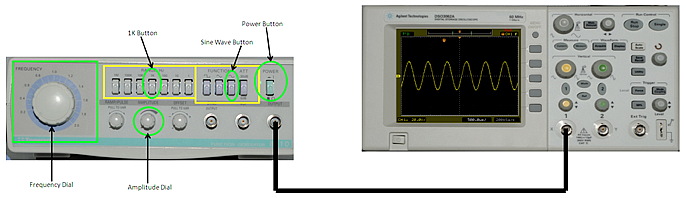
Figure 5: Slide showing students how to use the function generator to display a waveform on the DSO
The Multimedia Tutorial was created using the following processes (Oswald, Baccini, Hinckley & Wild, 2012; Oswald, Wild & Hinckley, 2012). High resolution images were created with a digital camera, which were then imported into Microsoft PowerPoint. Animations were created using the PowerPoint animation feature. A script was developed, and audio files created using a text-to-speech software package. A text speed of 180 words per minute was eventually selected. One audio file was created for each animation in Powerpoint. Camtasia Relay was used to create the Multimedia Tutorial in the form of an MP4 file.
The second study involved 20 students who had completed year 12 physics, or completed at least one other physics unit in their degree. This study involved investigating students' preferences on how these multimedia presentations should be designed. These experiments were conducted in scheduled laboratory classes with no academic penalty to their grades for students not participating in the study.
In this section, we will first analyse the average of students' performance for each of the questions in the pre-lab and post-lab tests. In the pre-lab test, there were nine questions, with the two groups answering questions 1-3 and 7-9 (which were worth 1 mark each) and questions 4-6 (which were worth 2 marks each). The first group (31 participants) only had access to the laboratory worksheet and there were 31 participants in this group. The second group (44 participants) had access to both the Multimedia Tutorial and laboratory worksheet. This test simply asks the students how to connect the oscilloscope to the function generator and what functions some of the buttons perform. Table 6 displays the percentages of how each group performed on each question in the pre-lab test.
The results from Table 6 indicate that explanations from the Multimedia Tutorial aided the students in completing the pre-laboratory test. The results show that the laboratory worksheet is either not totally clear in its explanation, or students are not able to easily infer what the instructions were implying to answer these questions. This can be easily seen as the group without the multimedia only achieved marks over 50% for two of the questions in the pre-lab test.
| No multimedia | With multimedia | ||
| Q1 | What type of cable is used to connect the function generator to the DSO? | 74.2 | 91.3 |
| Q2 | Which of the outputs do you connect the cable for the Function Generator? | 29.0 | 100 |
| Q3 | Which of the inputs do you insert the cable to the DSO? | 54.8 | 93.5 |
| Q4 | Which two buttons on the function generator, excluding the power button, do you need to utilise? | 0 | 82.60 |
| Q5 | What values do you set the frequency dial and amplitude dial to? | 48.4 | 96.7 |
| Q6 | What does the horizontal and vertical axes represent on the DSO screen? | 50.0 | 93.5 |
| Q7 | How do the horizontal and vertical scale dials alter the waveform on the DSO screen? | 12.9 | 60.9 |
| Q8 | How do the Positional Dials alter the waveform on the DSO screen? | 38.7 | 47.8 |
| Q9 | When should you use the Auto-Scale Button? | 0 | 56.5 |
On the other hand, the results for the group with the multimedia showed that, for all but one of the questions, the students achieve greater than 50% of the obtainable marks. The most concerning feature for the results is that for questions 7 to 9, the achieved marks dropped below 80% for the multimedia group. This would indicate that the explanations in this section are not clear, and that the explanations of the questions in these sections need to be improved.
The second part of this first study was a post-lab test analysing how students would measure the waveform they were asked to produce from the laboratory worksheet. There were three questions to this section, each worth one mark. Table 7 displays the average percentages for each group for each question.
These results were taken after the experiment was completed. The results indicate that, for the first two questions, the group using the Multimedia Tutorial performed significantly better than the group without the multimedia presentation. The most surprising result was the third question, where the group without the Multimedia Tutorial performed significantly better than the group with the Multimedia Tutorial. One reason for this could be that the explanation on how to perform this instruction was not as clear as it could be in the Multimedia Tutorial. Another reason might be that there was confusion in the instructions from the laboratory demonstrator, and the instructions given in the multimedia, if students were asked questions to perform this task.
| No multimedia | With multimedia | ||
| Q1 | For Channel 1 on the DSO, what setting should the coupling be set to? | 71.0 | 84.8 |
| Q2 | When taking your measurements, what multiplier was Channel 1 probe input set to? | 48.4 | 82.6 |
| Q3 | When displaying relevant data about the waveform, which button did you utilise? | 64.5 | 52.2 |
In summary, by modifying the original instructional design and creating the new multimedia instructional design using the principles in Table 5, we have successfully shown that student results did improve, and in some cases there was significant improvement over the old instructional method. By modifying the instructional design, we were able to reduce the extraneous load on students, freeing up more of the students mental resources to learn the material (as shown in Figure 3). Overall, the results in Tables 7 and 8 indicate that work is still required to improve the presentation. We still need to modify the instructional design of the Multimedia Tutorial, to make clearer and greater emphasis on key points where the students are still struggling. Work still needs to be completed on the last three questions of the pre-lab test and the last question of the post-lab test, while we still need to refine the overall presentation.
Another part to the survey asked the students, if further Multimedia Tutorial were to be created, what aspects of DSO operation students would want to have included. For this survey, we generated multiple options and gave the students the option to provide relevant feedback. The options offered to the students were: explaining oscilloscope functions, explaining how to use the function generator, how to measure on the oscilloscope, and how to connect the oscilloscope to other devices. The results for these questions are displayed in Figure 7.
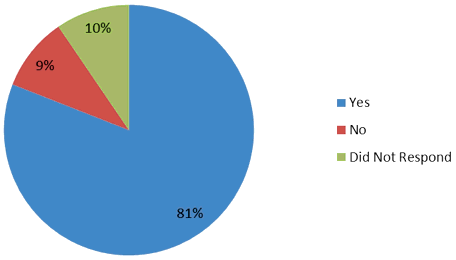
Figure 6: Respondents views to whether having access to the multimedia tutorial would
reduce issues that hampered their ability to complete the laboratory experiment.
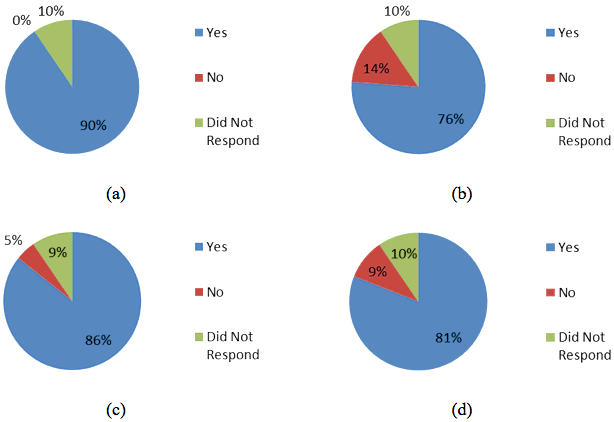
Figure 7: Student feedback for additional multimedia functionality, explaining (a) oscilloscope functions,
(b) how to use the function generator, (c) how to measure on the oscilloscope, and
(d) how to connect the oscilloscope to other devices.
The results from student feedback were: "the computer generated voice to talk slower", "voice could be slightly smoother", "voice more natural", "voice is disjointed", and "use a normal voice". These results illustrate that more effort needs to be spent on developing better text-to-speech conversion, that can provide a more realistically-voiced narration for the students, and can still provide the same benefits that the current software can achieve.
A secondary benefit is that the presentation demonstrates the specific test equipment that students will be exposed to in Physics and Engineering laboratory sessions in the School of Engineering. Our experiences have shown that students want instruction on the specific instruments they will use in the laboratory program, not a general presentation on an instrument that does not have the same controls (located in the same positions) as those used in the lab. The purpose of our project is to design a presentation for the students that relates to equipment that is utilised at ECU. Transferability of knowledge, in that we would also want students to develop generic skills that allow them to use any type and model of DSO, is also important. However, at this early stage of implementation of this Multimedia Tutorial, student confidence is considered more important that transferability, as this will allow students to quickly and efficiently develop fundamental operational skills for these specific DSOs. This aspect will be investigated in future studies.
Finally, the availability of relevant instructional multimedia allows students to easily access these learning tools online, both during and outside scheduled classes. This is useful, not only for initial instruction in the use and operations of a DSO (and function generator), but can also aid knowledge retention for future units of study, where it is assumed that students have already mastered the operation of a DSO.
Clark, R. C. & Mayer, R. E. (2008). Learning by viewing versus learning by doing: Evidence-based guidelines for principled learning environments. Performance Improvement, 47(9), 5-13. http://dx.doi.org/10.1002/pfi.20028
Culatta, R. (2012). Dual coding theory. Instructional Design. http://www.instructionaldesign.org/theories/dual-coding.html
Dean, D. & Kuhn, D. (2007). Direct instruction vs. discovery: The long view. Science Education, 91(3), 384-397. http://dx.doi.org/10.1002/sce.20194
Eggen, P. & Kauchak, D. (2007). Educational psychology: Windows on classrooms (pp. 200-222). Upper Saddle River, New Jersey: Pearson Education Inc.
Errey, C., Ginns, P. & Pitts, C. (2006). Cognitive load theory and user interface design: Making software easy to learn and use (Part 1). PTG Global. http://www.ptg-global.com/PDFArticles/Cognitive%20load%20theory%20
and%20user%20interface%20design%20Part%201%20v1.0.pdf
Institute of Physics (2010). Independent review of higher education and student finance. Institute of Physics response to an independent review, 28 January 2010, page 8. http://www.iop.org/policy/consultations/higher_education/file_41881.pdf
Mayer, R. E. (1997). Multimedia learning: Are we asking the right questions? Educational Psychologist, 32(1), 1-19. http://dx.doi.org/10.1207/s15326985ep3201_1
Mayer, R. E. & Moreno, R. (2003). Nine ways to reduce cognitive load in multimedia learning. Educational Psychologist, 38(1), 43-52. http://dx.doi.org/10.1207/S15326985EP3801_6
Mayer, R. E. (2003a). The promise of multimedia learning: Using the same instructional design methods across different media. Learning and Instruction, 13(2), 125-139. http://dx.doi.org/10.1016/S0959-4752(02)00016-6
Mayer, R. E. (2003b). Elements of a science of e-learning. Journal of Educational Computing Research, 29(3), 297-313. http://dx.doi.org/10.2190/YJLG-09F9-XKAX-753D
Muller, D. A., Eklund, J. & Sharma, M. D. (2006). The future of multimedia learning: Essential issues for research. Australian Association for Research in Education (AARE) 2005 International Education Research Conference, UWS, Parramatta, Sydney, NSW. http://www.aare.edu.au/05pap/mul05178.pdf
Muller, D. A., Lee, K. J. & Sharma, M. D. (2008). Coherence or interest: Which is most important in online multimedia learning? Australasian Journal of Educational Technology, 24(2), 211-221. http://www.ascilite.org.au/ajet/ajet24/muller.html
Oswald, D., Baccini, D., Hinckley, S. & Wild, G. (2012). Improving engineering students' skills using a digital storage oscilloscope using multimedia resources. In Proceedings 2012 Australian Association of Engineering Education (AAEE) Conference, Melbourne, Australia. http://www.aaee.com.au/conferences/2012/documents/abstracts/aaee2012-submission-163.pdf
Oswald, D., Hinckley, S. & Wild, G. (2012). Developing an educational video for utilising an oscilloscope in first year physics. In Proceedings Australian Institute of Physics National Congress 2012, Sydney, Australia.
Powell, M., Anderson, H., van der Spiegel, J. & Pope, D. P. (2002). Using web-based technology in laboratory instruction to reduce costs. Computer Applications in Engineering Education, 10(4), 204-214. http://repository.upenn.edu/cgi/viewcontent.cgi?article=1165&context=ese_papers
| Please cite as: Oswald, D., Hinckley, S. & Wild, G. (2013). Low cost educational video for first year undergraduate students using oscilloscopes. In Design, develop, evaluate: The core of the learning environment. Proceedings of the 22nd Annual Teaching Learning Forum, 7-8 February 2013. Perth: Murdoch University. http://otl.curtin.edu.au/professional_development/conferences/tlf/tlf2013/refereed/oswald.html |
Copyright 2013 Daniel Oswald, Steven Hinckley and Graham Wild. The authors assign to the TL Forum and not for profit educational institutions a non-exclusive licence to reproduce this article for personal use or for institutional teaching and learning purposes, in any format, provided that the article is used and cited in accordance with the usual academic conventions.